Audit trail
Append a signing audit to the end of signed PDFs on paid plans. The audit records details about the document and a timeline of when and where each recipient viewed and signed it.
The audit trail is available on the Pro, Team and Enterprise plans. It is not included on the Free plan.
What you'll do
- Enable the audit trail on a signature request
- Confirm the audit trail is active
- Understand what's recorded
1. Add a signature request to your workflow
You'll need a signature request set up first. See Get started with eSignatures.
2. Open the signature request block
In your workflow, click the signature request block.
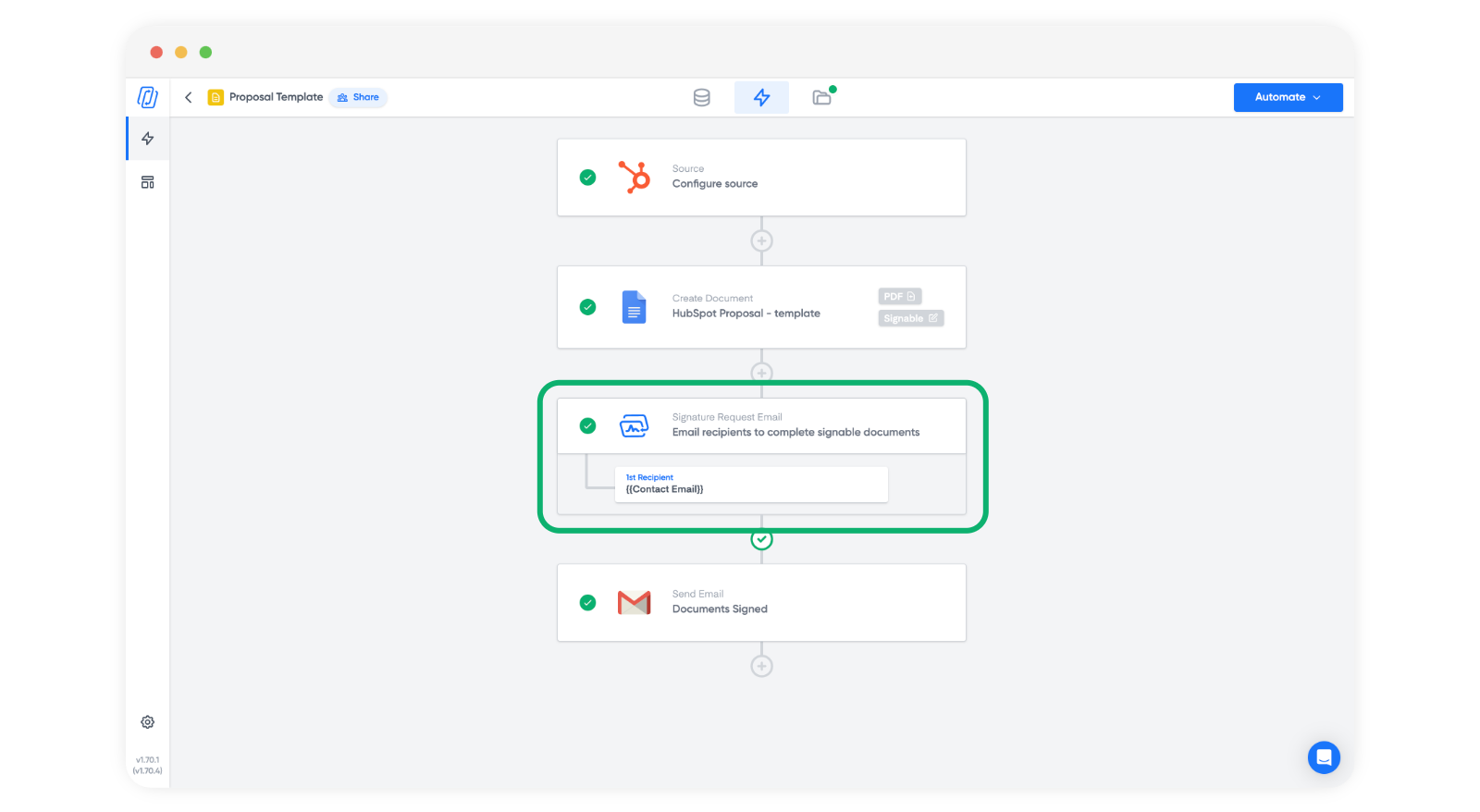
3. Enable the audit trail
On the right hand side of the block, find the Audit trail toggle. It's off by default. Turn it on to start including the audit trail in signed PDFs from this workflow.
Note: Turn the toggle on before you send the request. The audit trail can't be added to a document that has already been signed.
The audit trail also works for signing links and for PDFs you upload from the Signatures tab. Sending a one-off PDF instead? You can turn on the audit trail when you send it. See Manual PDF upload signature request.
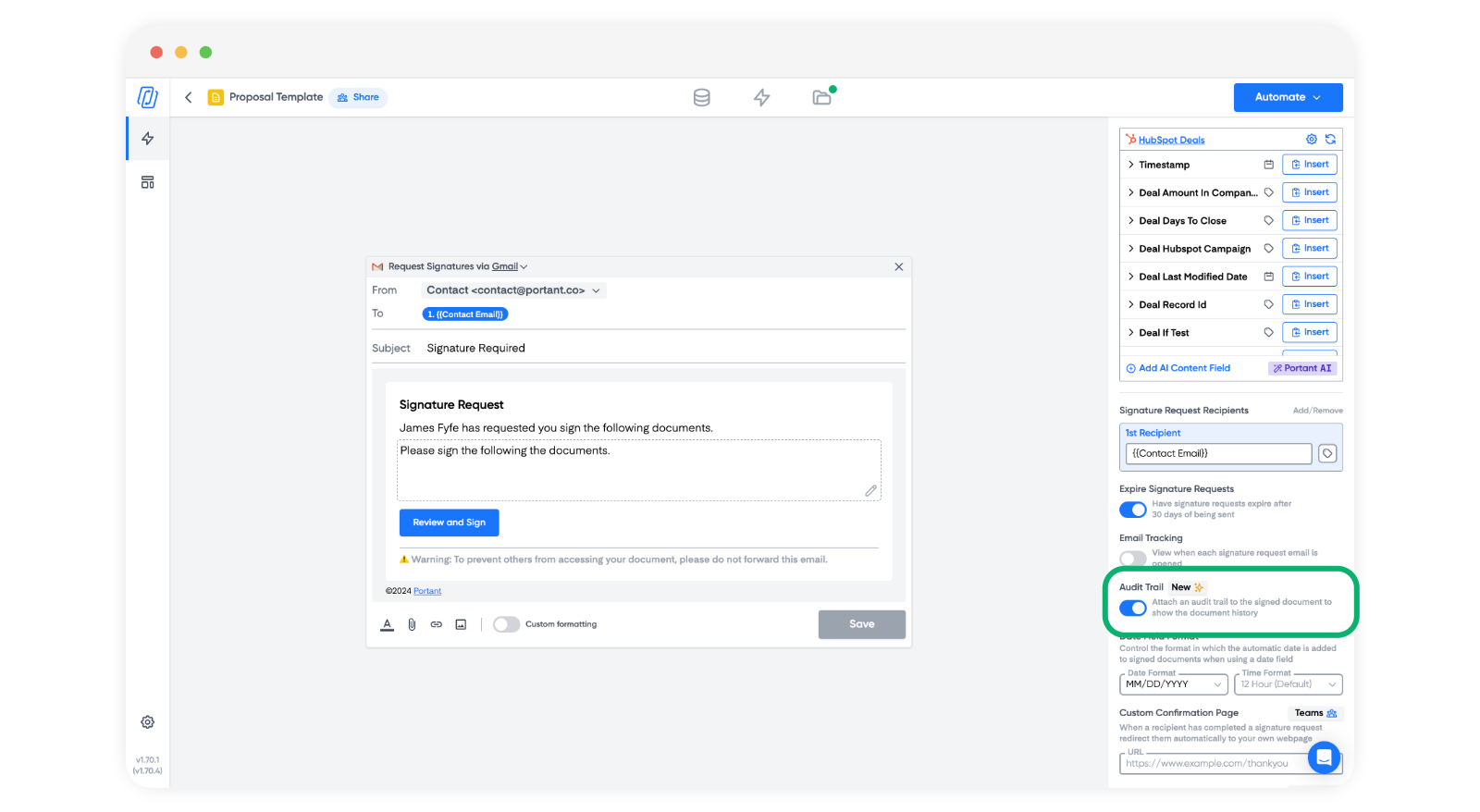
4. Confirm the audit trail is active
Run a test signature request through the workflow to see the audit trail on a real signed PDF.
What the audit trail looks like
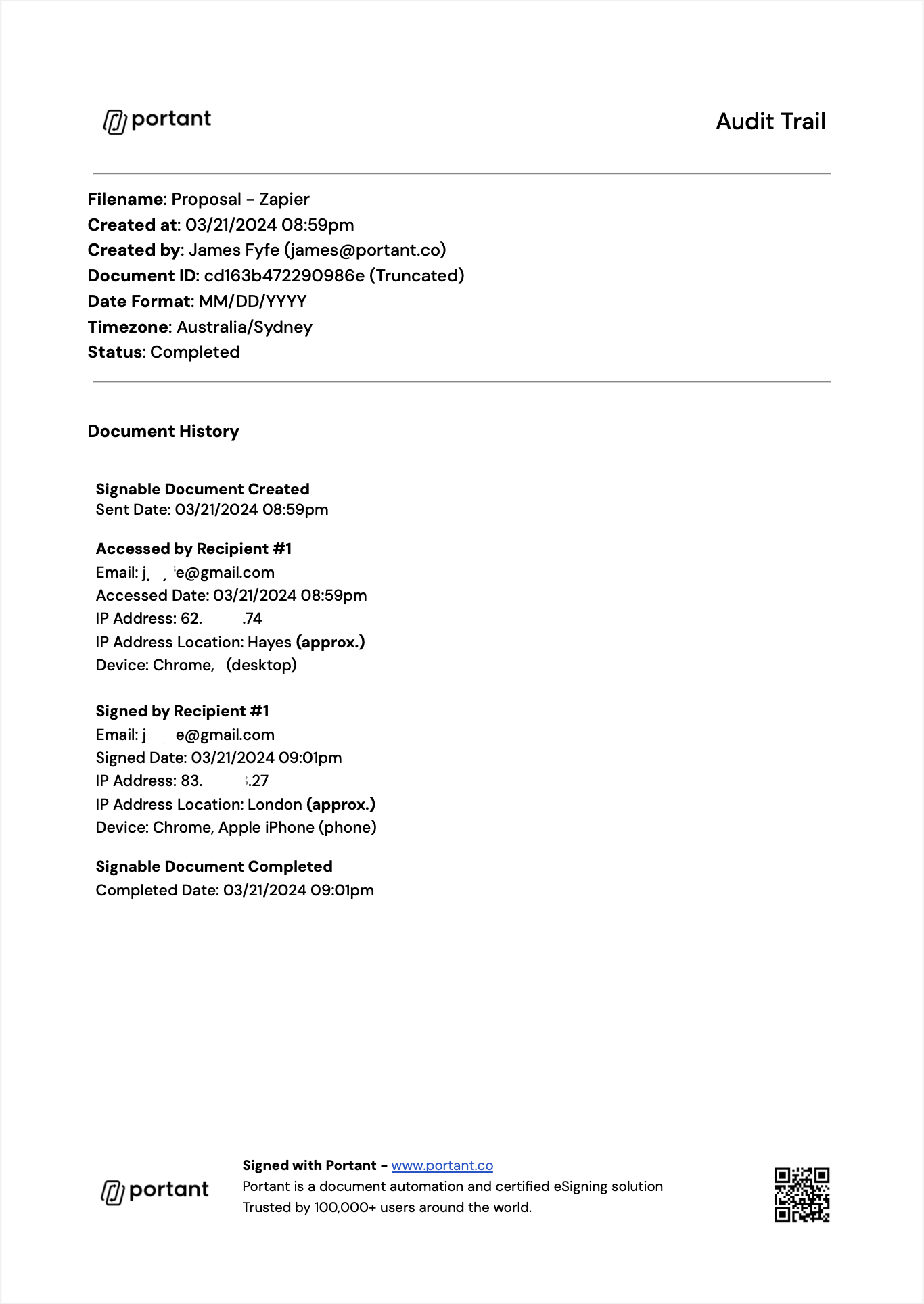
The audit trail is added as an extra section at the end of the signed document. It includes details about the document and a timeline of when and where each recipient viewed and signed it.
What the audit trail records
The audit trail page shows the filename, when and by whom (name and email) the document was created, the document ID, the date format, the time zone and the status. It then lists the document history:
- When the signable document was created and sent.
- For each recipient, each time they opened the document and each signature, with their email, the date and time, the IP address, the approximate IP location and the device.
- When the signable document was completed.
On signing links, the name and email the signer enters are saved with the signing details.
Some things the audit trail doesn't do:
- It doesn't check who the signer is. Anyone who has the signing link can sign. If a recipient forwards the request email, the person who receives it can sign. Keep sensitive requests to recipients you trust.
- It doesn't record a cancelled request.
- It covers signing only. It isn't a log of activity in your Portant account.
Every signed PDF is locked and hashed. Anyone can check a signed PDF at sign.portant.co. The check confirms only whether the file is an unchanged Portant document. It doesn't show who signed, when, or from where.
Portant hosts data on Google Cloud Platform (GCP). For how Portant processes personal data, see the Data Protection Addendum.
Why use an audit trail
- Record keeping. Keeps a timeline of when each recipient opened and signed the document, inside the PDF itself.
- Evidence. If a signature is questioned, a record of how the document was signed can help. The audit trail gives you that record. It doesn't change the legal form of the signature.
- Dispute resolution. Gives you a record to share with the other parties if questions come up later. When you turn on signature receipts, each signer also gets a copy of the signed PDF.
Legal standing
Under the EU and UK eIDAS rules, Portant signatures are simple electronic signatures (SES). Portant doesn't provide advanced (AES) or qualified (QES) electronic signatures. In the US, the E-SIGN Act (15 U.S.C. 7001(a)) says a signature cannot be refused legal effect only because it is electronic. Turning on the audit trail doesn't change any of this.
In every signing flow, the signer ticks "I understand that this is a legal representation of my signature" before they sign. This confirms their intent to sign. It isn't consumer consent under the E-SIGN Act (15 U.S.C. 7001(c)). Portant doesn't provide a consumer consent and disclosure flow, so where US consumer law applies, you must give those disclosures and get consent yourself.
Some documents are excluded from these laws or need a different form of signature. In the US, the E-SIGN Act (15 U.S.C. 7003) does not apply to:
- Wills, codicils and testamentary trusts
- Adoption, divorce and other family law matters
- Most records under the Uniform Commercial Code, other than sales and leases of goods (Articles 2 and 2A)
- Court orders, notices and official court documents
- Notices of utility shut-off, of default, foreclosure or eviction on a primary residence, of health or life insurance cancellation, and of product recalls
- Documents that must go with hazardous materials
State laws based on the Uniform Electronic Transactions Act (UETA), and other countries, have their own lists. See Compliance for an overview of the law in each country.
This page isn't legal advice. For regulated or high-value documents, check with a lawyer before you rely on an electronic signature.